
Animation Keypoints
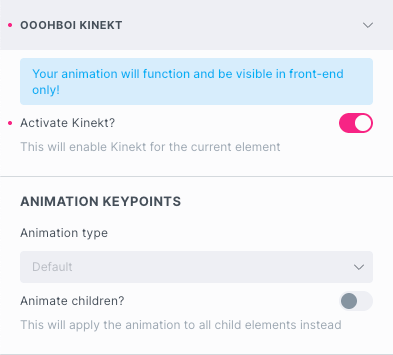
Animation type
The Animation Type drop-down options change for the selected element.
- All elements can be animated using “From – To”
- The text elements can also be animated with “Text Effects”
- The Image element allows you to apply the “Image effect” to it
- The SVG element can be animated with “SVG line draw on scroll”
- Certain elements may become a “Timeline controller”
With OoohBoi Kinekt, All elements term corresponds to any available element in Bricks Builder.
The Layout elements are Section, Container, Block and Div.
The Text elements only include Heading, Basic Text, and Rich Text.
The Image element refers to the Image element itself.
Some less commonly used elements are intentionally not animatable to maintain the OoohBoi Kinekt plugin’s lean design.

Animation ID
That should be the name/ID of your animation. It’s not a must but if you want to play the animation on a certain element mouseClick or mouseEnter, you’ll need it as a reference!
Dynamic values new in 2.1.3
Bricks dynamic data support is now enabled for Animation ID fields. For instance:
- {post_id} → resolves to current post ID
- {echo:myFunction()} → executes custom PHP function
- My animation {post_id} → resolves to “My animation POST_ID”
- {acf_field_name} → resolves to ACF field value
- Any other Bricks dynamic data tag
Pause Animation
By default all animations are triggered on-scroll. However, you can pause the animation thus making it playable via a “Timeline controllers“.
Animate Children
That option is only available if the chosen element belongs to the Layout Elements group!
It is meant to bulk-animate all the child elements of the selected element in a uniform fashion.
Animation Duration
The animation duration is the amount of time it takes for an animation to complete from start to finish.
It is specified in seconds, no need to add the unit at the end of the value!
Animation Delay
The animation delay is the amount of time that elapses before an animation starts executing.
It allows you to introduce a pause or wait period before an animation begins.
The delay is specified in seconds, no need to add the unit at the end of the value.
Animation Easing
In order to make the animation as realistic as possible, you can choose any of the predefined animation easing effects.
Leave unselected if you don’t prefer any available. In that case “none” will be used!
Disable animation at breakpoint
You can disable animation at specific Bricks builder breakpoints and all lower breakpoints. Beware that animation once disabled can no longer be enabled at any lower breakpoint.